Sunday, 4 December 2016

10 tips to protect your anroid device.

10 tips to protect your android device.

Smartphones have come to define us by being the portal to our online identity and as such should be treated with care and secured against any wrongdoing online (hacking) or offline (stolen). If you are not careful, losing your smartphone may mean more than just a loss in contacts and phone numbers. We’re talking about your social media accounts, your synced files, important documents, your emails, photos and messages.

Your entire information is traceable and downloadable and may be shared all over the World Wide Web if you are not careful enough.

While we’d love it if people don’t mess around with other people’s personal information, putting morale aside, this is the virtual world where thieves and hackers hide behind anonymity and are hard to trace. There is no one better to protect your own data, than you. We hope these tips and tricks will be of help in that endeavor.

1. Do Not Save All Of Your Passwords

 Many users tend to save their passwords to online services and sites on their device, never once thinking about what it would mean to a person who got their hands on the phone. Avoid having all important passwords saved in your device particularly when it comes to banking or payment apps.

2. Use Android In-built Security

If you are running on Jelly Bean, you can have a screen lock and encryption enabled to further enhance your security. There are many types of screen locks available for you to choose from such as password, pin, pattern and face unlock, available in your Android settings. Even when setting pins or pattern locks, try not to make it easy for hackers to guess your password.

3. Lock Your Apps

It is necessary to lock your apps, especially the ones holding private information that you wish nobody but you could see. This is a second layer of security to prevent anyone from using your lost device particularly if they have managed to bypass your locked Android.
You can use a free app like App Lock for this exact purpose. The idea here is not to lock every single app in your device, just really data-laden ones like your email apps or file managers.
While you at it, avoid using a combination of a pin or pattern lock that can be traceable from the smudges of your screen (Yes, it is traceable).

4. The importance of app permissions

Before you begin installing an app from Google Play, a list of requested permissions will pop up to show you what permission the app requires. Apps require permissions to do things but not all of them are necessary.Always read through the permissions to make sure they make sense and correspond to what the app actually does eg. an alarm app does not require a permission to access your text messages. This is a real important step because not all apps in the Play Store are safe. you have install app for trusted vendor.While you’re at it, make it a habit to read the comments as well as the rating of the app that you are going to download. This helps you understand more about what the app really does without trying it out firsthand.

5. Securing Your Network

One of the most important thing in protecting your Android is to secure your network. Try to avoid using public WiFi whenever you want to do something important like doing your banking online. As long you are sharing the same network with the public, they can easily sniff out your packets and translate it into actual data of your private information i.e. your passwords.
You can protect your information by using apps like Hideninja VPN so that your outgoing connection is always encrypted, making it harder for anyone to sabotage your data. If you suspect that your device is being attacked, WiFi Protector can help fend off these attackers. To further enhance your network security you can apply settings from SecDroid but note that this app is only for rooted phones.

6. Use Mobile Security App

It will make your job easier to have an app that handles most of your security issue. Find a mobile security app that you are comfortable using, for example: Lookout Security & Antivirus and avast! Mobile Security. Even with a security app, you shouldn’t let your guard down as Android malware is getting stronger and more rampant, which brings us to the next tip.

7. Create Multiple User Account To Protect Privacy

If you own an Android tablet and have to share it with a sibling, a spouse, or your kids, having multiple user accounts will help each of you protect your privacy. In Jelly Bean for tablet, there is an option for you to create multiple user accounts. You can create another general account for anyone who wants to use your device. The option is under the Settings > Users section.

8. Prepare A Backup Of Your Data

A backup of your precious data is a must-have in the day and age of smartphones. Picture the worst case scenario where your Android device has been stolen or hacked. The last thing you can do is perform a remote wipe (see #10). Without a backup, you will lose all your information in your device.
Even if you could retrieve your stolen phone, chances are that hackers that have managed to access your device will render it useless. If you have a backup however, you can still restore your Android device back to its original state. You can choose to backup important information to the Cloud, your desktop or even to a flash drive, for insurance.

9. Track Your Lost Device

So you have a backup already but you really want to get your lost device back. Well, as the smartphone industry would have it, your phone is built to be trackable, via GPS. The catch is, you have to enable GPS on your phone for it to be tracked. Fret not because, there are plenty of device-tracking apps for Android that can help you locate your lost or stolen device, some can even turn on the GPS on your phone remotely.

10. Enable Remote Wipe

So you are at the point where you have everything installed and ready to go. But, you still need one last feature – the ability for you to wipe your device remotely. This is necessary, especially when you are sure that your Android is lost (forever). There’s no crying over spilt milk now – we can only prevent them from turning it into cheese.
I recommend 3CX Mobile Device Manager because it is free and easy to use. You can sign up for the account here and let just hope that the day you need to use their remote wipe feature will never come.


Thursday, 10 November 2016

5 Ways People Use to Convert Black Money into White Money


 Dushmanta Mohapatra
The Article no ways encourage taxpayers to use any of the below methods. The Article is just to let people know about what others are doing to convert their Black Monet into white money currently in India. In addition to those mentioned below there are many other methods which people use to convert their black money into white money.
CASE 1: Go to a Jeweler. Give him the amount you want to convert into white as cash. he would give you a cheque back for the same amount less 4%. He would give you a purchase bill to show that you have sold silver utensils to him. On the amount of the cheque when you file your return you will have to pay no capital gain tax as Silver utensils are Personal effects and capital gain does not arise on sale of personal effects. There you go , the money is white now!!!
CASE 2: Conversion of Black Money to White Money with the application of Sec 51 of the Income tax act, 1961.
Mr. X : A Business man who wants to convert his black money to white.
Property: Cost of Acquisition: Rs. 10 Lacs.
Mr. Y: A Salaried person who wants to convert his white money to black may be because he has to make payment in black for the property purchased by him.
Mr. X enters into an agreement with Mr. Y for the sale of property for Rs. 150 lacs with a condition that advance money of Rs. 30 lacs shall be given by Mr. Y and balance shall be paid within 3 months else advance money shall be forfeited.
Modus Operandi: Mr. Y makes payment of Rs. 30 lacs to Mr. X by way of a cheque as the advance money and Mr. X in turns gives the black money to Mr. Y of the same amount. Now, Mr. Y intentionally fails to make balance payment within the due time and the amount is forfeited by Mr. X. In this manner black money of Mr. X is converted to white money.The money is white now!!!
CASE 3: Another popular way of converting black into white money is by getting a gift from a relative. For this modus operandi, the relative must possess white money. For example, you have some black money (say Rs. 10 lacs) which you want to convert into white. You can ask your relative to gift you Rs.10 lacs by way of cheque and you will in turn transfer your black money to him/her. Here 56(2)(vii) is not attracted as gift is received from a relative.
CASE 4:- Converting black to white by way of cheque
People also give the black money to a person (say a family member or a friend) and take a cheque from them. They show that as a loan receipt and thus they can temporarily convert their black money into white.
Then they again give them a check as a repayment of loan and receive cash which converts white to black again, but during the time the loan is outstanding, they convert their black into white, but people who do this are not aware that Section 68 on loans is applicable and you will have to prove the creditworthiness as well as the genuineness of transactions to the IT Department or else the loan receipt will be treated as income from undisclosed sources.
CASE 5: Another popular way of converting black into white money is showing income in cash like tuition income or any other professional fees.Just pay the tax at normal rate and your money is white now!!!!
Also people make investment where it is allowed to invest in cash and where the maturity is tax free for example buying an insurance policy where you are not required to show all your premiums and the maturity is tax free. For example your insurance premium is 25000/- per annum and you can pay 6000 in check (shown in books) and remaining in cash, people increasing the proportion of premium paid in cash increasing as and pay entire premium in white for last two years before maturity. No ITO is going to check premium of more then last two years and it is a small example. People are paying huge cash premiums everyday. In case of this small premium, the cost of investigation exceeds the benefit to the exchequer so the ITO will give a test check for at the max last two years.
DISCLAIMER
  • I don’t recommend readers to follow any of these steps. I just want them to be aware regarding these false practices.
  • I encourage open discussion regarding this article but advices, opinions, suggestions which may land the opinion seekers into trouble later on are not encouraged.
  • I trust that a tax planning should be done in such a way that it can stand the test of the legal battle of course subject to debates.


how to convert black money to white money in thchnical way ?

What is Black Money – Black money is tax evaded income. It can be earned through both legal and illegal means. The majority of the black money is the income received in cash not accounted in books and not revealed to the government for tax purposes.

How does the black money get generated?
Corruption– Mr. Blackappa, an officer in government service, demands Rs.1 lakh from Mr.Shortcut for doing a favour (say to approve the building sanction plan). Mr. Shortcut hands over Rs.1 Lakh to the officer in cash (no one takes a bribe in cheque/demand draft!). This money will not be accounted in the books of Blackappa and he won’t pay any taxes on it (it may be good to legalize bribe and collect taxes on it) Count # 1 – Rs.1,00,000 black money is generated.
Sale of property – Mr. Greedy buys a property from Mr. Cheat for a total sale value of Rs.50 Lakhs. He takes Rs.35 Lakhs in cheque/DD and the balance in cash. He pays stamp duty on Rs.35 Lakhs, and the seller pays capital gain tax considering the value as Rs.35 Lakhs. Count # 2 – Rs.15,00,000 black money is generated.
Sale of goods/services without invoice – You buy a sofa set from a furniture dealer. What is the price? The shopkeeper will tell “the price is Rs.60000 plus taxes at 14.5%”. Any discount? The answer from him will be “Yes madam, I can offer it at Rs.58,000 without the bill. If you want, I can write on a piece of paper or on a quotation” Count # 3 – Rs.58,000 black money is generated.
Accounting for fictitious expenses –  A businessman tells his accountant “I can’t pay so much tax. Do something, reduce the taxes” The accountant accommodates by booking fictitious expenses. If the businessman declares a profit of Rs.15 Lakhs against the actual profit of Rs.25 Lakhs, black money of Rs.10 lakhs is created. Count # 4 – Rs.10 Lakhs black money is generated.

How is it converted?
The difficult part is converting the black money into white money without any taxes. In all the above examples, the people who have earned money in cash (black money) can’t deposit it in the bank. Right? So, they have to hoard the cash somewhere, say in a bank locker, suitcase, etc. Or they can also spend this amount in cash towards the purchase of property, white goods, etc. Let’s understand the ways of converting black money.
Showing fictitious sales – There was a movie casted by the son of a powerful politician. This movie was an utter flop. But, it ran ‘houseful’ (fictitious) in Kalpana Theatre of K G Road for a year! During those days, people were talking that the black money earned by the father is converted into white by showing the income from the movie!
The money earned through illicit means or corruption is converted with the help of businessmen by booking fictitious sales in the books of the company.
Increase the sale price of an asset – One of my clients decided to buy a property from a senior government officer for a price of Rs.42 Lakhs. But the Officer wanted him to pay Rs.60 lakhs in cheque! In turn, he wanted to return the difference amount of Rs.18 Lakhs and additional stamp duty/registration charges in cash to the buyer. Thereby the Officer converted Rs.18 Lakhs of black money to white without paying any taxes. (He reinvested the sale proceeds in another property and got the long term tax exemption!)
Hawala Route – Have you heard about hawala transactions? If not, I will tell you in simple words. Assume Mr.ABC, a politician or government officer in Bangalore has Rs.25 Lakhs in cash. Since it is black money, he can’t deposit the same in the bank. So, he identifies a hawala agent (don’t search in google, you won’t get one!). The Hawala operator takes the cash in Bangalore and through his counterpart, hands over Rs.25 Lakhs worth in dollars/pounds/dirhams in a foreign country to his/to his representative. Mr.ABC gets this money back to India as Foreign Direct Investment (FDI) or seed fund in a private company, etc. Or he may choose to invest abroad in properties / shares. Thus, he converts black money to white without paying any taxes.
Depositing in banks less than Rs.50000 – This route is taken by small time operators. They open multiple bank accounts and deposit cash upto Rs.50000 at a time. Remember, if you have to deposit over Rs.50000, you have to give PAN details to the banker. Mostly, these kind of petty transactions goes unnoticed by the income tax department and thus, black money is converted to white without paying any taxes.
Agricultural Income – Agricultural Income is exempt from Income Tax. This means the money earned from the sale of paddy, pepper or wheat is exempt from tax. So, the people who earn black money will obtain a fictitious receipt from traders in agricultural commodities as if they have sold the products. For the sake of records, these people will acquire or show the proof of ancestral property in villages!
Gifts from relatives and friends on occasions – Any amount of money received from relatives (gift) is exempt from Income Tax. Is it not an easy way to convert black money to white? Simple, show the cash received in your son’s or daughter’s birthday as gifts from relatives!
Gifts from non-relatives and friends attract income tax. But those who have huge black money can show gift and pay taxes. Still the money earned through corrupt practices can be converted into white (after paying taxes). One of the classic examples is the amount of gift declared by a former Chief Minister who paid huge taxes during that year. She declared around Rs.200 Crores as gift received from her well-wishers and paid taxes on it!
Sale of Gold and Diamonds – Well-known professionals suggest this route. Suppose, Mr.XYZ has Rs.25 Lakhs cash and gives this amount to a Jewellery shop (not all shops will do this kind of dirty job). The Jewellery shop will issue a receipt for having bought Gold/Diamond worth Rs.25 Lakhs and make payment in a cheque to Mr.XYZ. For facilitating this transaction, he will charge a fee. Thus Mr.XYZ converts his black money into white, without paying any income tax.

Avenues for spending black money in black
Investing in property – The middle-class black money earners spend/invest them in black. For example, Mr.GHK sells a house for Rs.90 Lakhs (of which, he takes Rs.30 Lakhs in Cash – black) and reinvests/buys another flat/plot by giving Rs.30 lakhs apart from white money. So, the rule is Black for Black and white for white
Spend on weddings and functions – I needn’t explain it. If you attend the weddings at Palace Grounds in Bangalore and hi-fi wedding halls, you will get to see the ‘real color’ of black money. As I understand there are people who spend 2-5 Crores for a wedding! A large sum of corrupt money is spent on social events and functions.
Buying goods/services where the identification is not mandatory – For example, white goods, building houses and its interiors, etc., are done using black money earned in cash.
School Fee and donations – You may be aware of donations! For the medical seat, over a crore of rupees to be paid as a donation in cash!
Buying gold / precious metals – Instead of accumulating cash, people will buy gold, diamond and other precious metals. People buy gold in small quantities, from different shops, in the name of all members of the family.
Elections – As per the Election Commission of India, a maximum of Rs.70 lakhs can be spent by a candidate per Lok Sabha Constituency. Do you believe that they spend only Rs.70 lakhs? I understand that each candidate spends over Rs.30 Crores per Lok Sabha Seat!  From where is this kind of money available? Corrupt money is spent in elections.

Now the big question – Is this not known to the Government? What actions have they taken to curb the black money? Honestly, so far, nothing much is done, except ‘lip service’ by a few politicians and a few ‘cosmetic’ changes in the law.
Recently, Special Investigation Team (SIT), appointed by the Supreme Court has come out with its findings and suggestions to curb black money. In my next article, I will write about other sophisticated ways of converting black money such as creating multi-layer companies, rigging in stock market, participatory notes, etc. and also the recommendations of SIT report.

Thursday, 20 October 2016

Computer networking devices

Computer Networking Devices Explained with Function

This tutorial explains common computer networking devices such as HUB, Switch, Router, Bridge, Brouter, NIC, Proxy and Gateway including their functions, types and definitions in easy language with examples.

 A computer network is basically a group of multiple networking devices connected together for data sharing. Collectively networking devices have single purpose “securely transfer data as fast as they can”. To achieve this goal every networking device has its own functionality.
Let’s have a look on some common networking devices.

Network Interface Card (NIC)
In the list of networking devices, NIC stands on first place. Without this device, networking cannot be done. This is also known as network adapter card, Ethernet Card and LAN card. NIC allows our PC to communicate with other PCs. Basically it converts data transmission technology. A PC uses parallel data transmission technology to transmit data between its internal parts while the media that connects this PC with other PCs uses serial data transmission technology. A NIC converts parallel data stream into serial data stream and vice versa serial data stream is get converted in parallel data stream.

  Usually all modern PCs have integrated NICs in motherboard. NICs are also available separately. For desktop or server system they are available in adapter format which can be plugged into the available slots of motherboard. For laptop or other small size devices they available in PCMCIA (Personal Computer Memory Card International Association) card format which can be inserted in PCMCIA slots.

Types of NICs

There are two types of NICs
Media Specific :- Different types of NICs are required to connect with different types of media. For example we cannot connect wired media with wireless NIC card. Just like this, we cannot connect coaxial cable with Ethernet LAN card. We have to use the LAN card that is particularly built for the media type which we have.
Network Design Specific :- A specific network design needs a specific LAN card. For example FDDI, Token Ring and Ethernet have their own distinctive type of NICs card. They cannot use other’s NIC card.

HUB

HUB is used to connect multiple computers in a single workgroup LAN network. Typically HUBs are available with 4,8,12,24,48 ports. Based on port type, there are two types of HUB:-
Ethernet HUB :- In this type of HUB all ports have RJ-45 connectors.
Combo HUB :- In this type of HUB ports have several different types of connectors such RJ-45, BNC, and AUI.
HUBs generally have LED (light-emitting diode) indicator lights on each port to indicate the status of link, collisions, and other information.
To understand the functionality of hub let’s take an example from real life.
There are four friends who share everything. One of them finds a photo of Amitabh Bachchan. To share this with friends, he will make three photo copies from Xerox machine and give one copy to each friend. He doesn’t need a copy of photo for himself as he has the original one.
Now change the characters in this example. Replace friends with HUB’s port, photo with data signal and Xerox machine with HUB.
There is a HUB which has four ports. Ports share everything. One port received data signal from its connected device. It will make three copies of data signal from HUB and give one copy to each port. Receiver port doesn’t need a copy of data signal for itself as it has it the original version.
This is what exactly a HUB do. When a hub receives signal on its port, it repeats the signal and forwards that signal from all ports except the port on which the signal arrived.
There are two types of HUB
Passive HUB:- It forwards the data signal from all ports except the port on which signal arrived. It doesn’t interfere in data signal.
Active HUB:- It also forwards the data signal from all ports except the port on which signal arrived. But before forwarding, it improves quality of data signal by amplifying it. Due to this added features active HUB is also known as repeaters.

Usually HUB has one or more uplink ports that is used to connect it with another HUB. Right cable type is required to connect two HUBs.
First hub’s portSecond hub’s portCable type
UplinkUplinkCrossover cable
UplinkregularStandard cable
RegularUplinkStandard cable
RegularRegularCross cable
Logically HUB creates a star topology where it sits in the center of the topology and all connected systems stays at the points of the star.
Physically HUB creates a bus topology where all connected systems share the same bus connection.
There are two similar devices to HUB, MAU and Patch Panel.
MAU :- MAU (Multi Access Unit) is the sibling of HUB for token ring network. The only differences between HUB and MAU are :-
  • HUB is used for Ethernet Network while MAU is used for Token ring network.
  • HUB creates logically star topology while MAU creates logically ring topology.

Patch Panel :- It is used to organize the UTP cables systematically. It doesn’t interfere in data signal.

HUB and Repeater works at Layer 1 (Physical layer). These devices only understand the signals. Signals received on incoming port are forwarded from all available ports.
While signals are being forwarded no other ports should receive another signals (data) form their connected devices. If other port receives signals (data) while current transmission is going on, it will create collision.

Collision

Collision is the effect of two devices sending transmissions simultaneously in Ethernet. When they meet on the physical media, the signals from each device collide and damaged.

Collision domain

Collision domain is the group of devices that share same collision effects over the Ethernet network.

CSMA/CD

It is a mechanism of removing collision from network. When two or more nodes simultaneously sense the wire and found no signals, and each device places it’s signal on the wire. These signals would be collide in wire and a collision will occur.
Before placing any signal in wire, NIC (Network Interface Card) examines wire for any existing signal. This method is known as CS (Carrier Sense).
If two NICs sense wire on exactly same time and see no signal then both will place their signals in wire. This is known as MA (Multiple Access).
If the NICs see a collision for their transmitted signals, they have to resend the signals. In this situation, each NIC that was transmitting a frame when a collision occurred creates a special signal, called a jam signal, on the wire, waits a small random time period, and examine the wire again. If there is no signal in the wire, NIC will retransmit its original signals again.


The more devices you place on a segment, the more likely you are going to experience the collisions. More devices means more random time interval, creating even more collisions, gradually slowing down a device’s access when trying to transmit the data.
If a 100Mbps HUB has 10 ports, it means each port will effectively get only 10 Mbps (one tenth of total bandwidth.) Situation can be more worse if we connect this HUB with another HUB on uplink port. Each new node will decrease the available bandwidth for other nodes in network.
Bridge solves these (bandwidth and collision) major issues of HUB.

Bridge

To improve the performance, usually networks are divided in smaller segments. Bridge is used to divide a large network in smaller segments. For example a network has 70 nodes. Without segmentation all these nodes will share same collision domain that will bring down overall network performance. To run a network smoothly we should not place more than 20 nodes in a collision domain. To deal with this situation we can use Bridge. Bridge has per port collision domain. It means if a port faces collision, other ports will not effect from this collision. If we use a four ports bridge in our example network, we will get four collision domains.


Basic function of Bridge are following :-
  • Break a large network in smaller segments.
  • Join different media types such as UTP with fiber optic.
  • Join different network architectures such as Ethernet with Token Ring.
A bridge can connect two different types of media or network architecture but it cannot connect two different types of network layer protocol such as TCP/IP or IPX. Bridge requires same network layer protocol in all segments.
There are three types of bridge:-
Local Bridge :- This bridge connects two LAN segments directly. In Ethernet Implementation it is known as Transparent bridge. In Token Ring network it is called Source-Routed bridge.

Remote Bridge :- This bridge connects with another bridge over the WAN link.

Wireless Bridge :- This bridge connects with another bridge without wiring between them.

In OSI Layer model Bridge works at physical layer and data link layer.
Bridges have following issues :-
  • Bridges have limited ports.
  • In bridge forward decision are made through the software which slow down overall performance of network.
  • Bridges use age old technology which is not capable to fulfill the requirement of modern networks effectively.
Switch and Router solves these issues.

Switch

Just like Hub and Bridge, switch is also used to connect multiple computers together in a LAN segment. Switches available with 4,8,12,24,48,64 ports. Each switch port has a separate collision domain. Switch works at layer two in OSI Layer model. At layer two data signals are formatted in frames.
When a switch receives frame, it checks FCS (Frame checksum sequence) field in it. Switch process the frame only if it is valid. All invalided frames are automatically dropped. All valid frames are processed and forwarded to their destination MAC address.
Switch makes their switching decisions in hardware by using application specific integrated circuits (ASICs). Unlike generic processor such as we have in our PC, ASICs are specialized processors built only to perform very few particular tasks. In cisco switch ASICs has single task, switch frames blazingly fast. For example an entry level catalyst 2960 switch has frame rate of 2.7 million frames per second. Higher end switches have higher FPS rate such as Catalyst 6500 has a rate of 400 million FPS rate.

Switches support three methods of switching.
  1. Store and Forward
  2. Cut and Through
  3. Fragment Free

Store and Forward

This is the basic mode of switching. In this mode Switch buffers entire frame into the memory and run FCS (Frame Check Sequence) to ensure that frame is valid and not corrupted. A frame less than 64bytes and higher than 1518bytes is invalid. Only valid frames are processed and all invalid frames are automatically dropped. Among these three methods, this method has highest latency. Latency is the time taken by device in passing frame from it.

Cut and Through

Cut and Through method has lowest latency. In this method Switch only read first six bytes from frame after the preamble. These six bytes are the destination address of frame. This is the fastest method of switching. This method also process invalid frames. Only advantage of this method is speed.

Fragment Free

This is a hybrid version of Store and Forward method and Cut and Through method. It takes goodies from both methods and makes a perfect method for switching. It checks first 64 bytes of frame for error. It processes only those frames that have first 64bytes valid. Any frame less than 64 bytes is known as runt. Runt is an invalid frame type. This method filters runt while maintaining the speed.

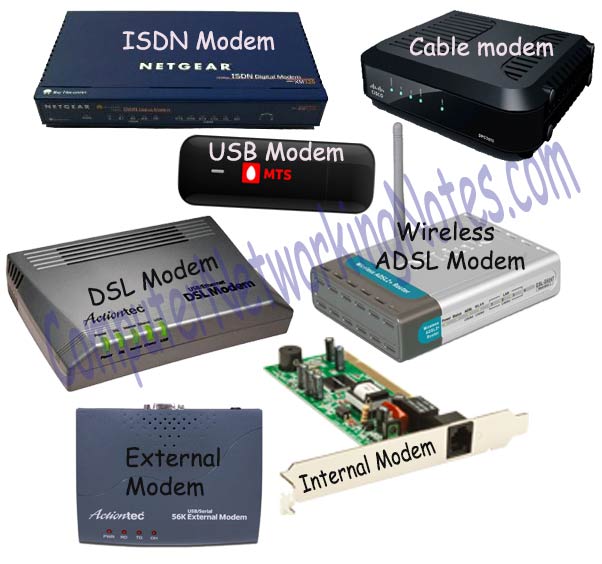
Modem

In simple language modem is a device that is used to connect with internet. Technically it is a device which enables digital data transmission to be transmitted over telecommunication lines. A Telco company uses entirely different data transmission technology from the technology that a PC uses for data transmission. A modem understands both technologies. It converts the technology that a PC uses in the technology which a Telco company understand. It enables communication between PC (Known as DTE) and Telco company’s office (Known as DCE).


There are two types of connection line between DCE and DTE
Analog connection line
An existing telephone or cable TV network line that uses analog signals (sound waves) for transportation. Instead of supporting Internet, these lines were primarily installed for their respective requirements.
Digital connection Line
A separate connection line between DTE and DCE. Since it is installed primarily for internet, it uses digital signals for data transportation.
For analog connection line we have to use analog modem and for digital line we need to use digital modem.

Analog Modem

Analog modem converts analog signal in digital signal and vice versa.
There are two types of analog modem; internal and external.

Internal Modem

Internal modem is available as interface card for desktop and as PCMCIA card for laptop . We need to install it on available slot of motherboard. In comparison with external modem these are inexpensive. As these modems usage computer’s CPU for data encoding and decoding. We have to purchase these modem separately.

External Modem

External modem is a separate device that has its own CPU and memory. Usually Telco company provide this with connection. Depending on subscription it may be free or chargeable.

Digital Modem

Instead of signal conversion, digital modem performs modulation known as line coding. Line coding is used to modulate the digital signal in such a way that they can be transmitted over the digital line. DSL, ADSL and ISDN modem are the examples of digital modems.

DTE

DTE (Data Terminal Equipment) is a device (usually a router or PC) that converts data frame into signals and reconvert received signals in data frame. DTE device communicates with DCE device.

DCE

DCE (Data circuit terminating equipment) is a device (usually modem, CSU/DSU or Frame Relay switch) that provides clock rate and synchronization.

CSU/DSU

A CSU/DSU (Channel Service Unit/Data Service Unit) is a device that converts data signal between LAN network and WAN network. LAN network and WAN network uses separate communication technology. A CSU/DSU understands both technologies. DSL and cable modems are the example of CSU/DSU.


Router

Router is a layer three device which forwards data packet from one logical network segment to another. Router forwards packets on the bases of their destination address. For this router keeps record of the path that packets can use as they move across the network. These records are maintained in a database table known as routing table. Routing table can be built statically or dynamically.

Basically routers are used :-
  • To connect different network segments.
  • To connect different network protocols such as IP and IPX.
  • To connect several smaller networks into a large network (known as internetwork)
  • To break a large network in smaller networks (Known as subnet usually created to improve the performance or manageability)
  • To connect two different media types such as UTP and fiber optical.
  • To connect two different network architectures such as token ring and Ethernet.
  • To connect LAN network with Telco company’s office (Known as DTE device).
  • To access DSL services (known as DSL Router).

Brouters

Brouters are the combination of router and bridge. It can be used as a bridge or router. Brouters are the earlier implementation of the routers.
 

At layer two it’s a fairly expensive device. which cost more than other high end switches that work much faster than it. At layer three it has a lot of complexity. Due to these drawbacks it is rarely used. Gradually it has been replaced by high end switch at layer 2 and by router at layer three.

Gateway

Gateway is used to forward the packets which are intended for remote network from local network. Till host is configured with default gateway address, every packet should have default gateway address. A default gateway address is the address of gateway device. If packet does not find its destination address in local network then it would take the help of gateway device to find the destination address in remote network. A gateway device knows the path of remote destination address. If require, it also change the encapsulation of packet so it can travel in other network to get its destination address.

Examples of Gateway

Email Gateway :- Translate SMTP e-mail in standard X.400 format before forwarding.
GSNW Gateway :- Allow windows clients to access resources from NetWare server.
PAD Gateway :- Provides connectivity between LAN network and X.25 network.

Transceivers (media converters)

Transceiver is a small device that has capability of receiving and sending both analog and digital signals. Usually it is inbuilt in network interface card. But it is also available separately in market. It detects the type of signal from network wire and converts the passing signal to match with it. For example a transceiver is attached with a device that transmit signal in digital from. Now suppose this device is connected with the network wire that uses analog form for data transmission. In this case transceiver will convert digital signal in analog signal before placing them in network wire.

Proxy

Proxy can be a dedicate device or software. Proxy is used to hide the internal network from external world. If we use proxy then there would be no direct communication between internal network and external network. All communication will go through the proxy. External computer will be able to access only proxy. Thus Proxy makes tampering with an internal system from the external network more difficult.

 NOTE:- I hope this blog help for your network device knowledge.


Saturday, 1 October 2016

Best android trick

1. How We Can Reduce Battery Consumption

You can minimize your battery power consumption using the cool trick in developer mode explained in steps below.
Go to Settings -> Developer Options.
Scroll down and there look for Window animation scale, Transition animation scale, and Animator duration scale.
Now adjust the scale and better is to select the 0.5x in all the above options.

2. Fake The Current GPS Location

For this you can use the Mock the Location to make your GPS tracker fool to track your exact location which can be used by many apps to spy on you.

3.  Make Your Device Awake while Charging

You can make your android active while you charging it and its the best indicator, so you can enable this cool feature as:-
Go to Settings -> Developer Options.
Tap on Stay Awake to tick it.
This will enable the phone to not off the screen unless you do so.

4. Create Desktop Backup Password

You can create backup password for your android device to recover it using your desktop. Just follow the below steps to proceed.
Go to Settings -> Developer Options.
Tap on Desktop backup password.
Fill in the current password, then type and retype the new password for full backup.

5. Enable Higher Graphic Render For Games

MSAA For OpenGL Games can be enabled in your android device to allow android games to run with high graphics quality that can enabled as:-
Go to Settings -> Developer Options.
Tap on Force 4x MSAA.

 6. Display CPU Usage Overlay

In your android device you can enable the complete CPU meter get displayed in your android device by which you can easily judge which app is putting much load on your android.
Go to Settings -> Developer Options.
Tick on the Show CPU Usage option there.
Now you will see all your CPU usage at the right of your android screen

7. Android Secret Hacking Codes –

*#*#4636#*#*  – Display information about Phone, Battery and Usage statistics
*#*#7780#*#* – Restting your phone to factory state-Only deletes application data and applications
*2767*3855# – It’s a complete wiping of your mobile also it reinstalls the phones firmware
*#*#34971539#*#* Shows completes information about the camera
*#*#7594#*#* Changing the power button behavior-Enables direct poweroff once the code enabled
*#*#273283*255*663282*#*#* For a quick backup to all your media files
*#*#197328640#*#* Enabling test mode for service activity
*#*#232339#*#* OR *#*#526#*#* Wireless Lan Tests
*#*#232338#*#* Displays Wi-Fi Mac-address
*#*#1472365#*#*  – For a quick GPS test
*#*#1575#*#* – A Different type GPS test
*#*#0283#*#* – Packet Loopback test
*#*#0*#*#* – LCD display test
*#*#0673#*#* OR *#*#0289#*#*  – Audio test
*#*#0842#*#* – Vibration and Backlight test

8. Bypass Android Lock Screen If You Forget Your Lock Screen Password Or Pattern

In this post you can crack or hack the lock screen of android phone, but all data will get deleted using thing method.

9. How To Hack Wifi With Rooted Android

Hacking is cool but it is illegal too, so my trick is for knowledge purpose and not for illegal purpose. You can hack wifi network with some apps given in this post. You can hack wifi directly with your android phone. Try this in your android.

10. 10 Best Apps For Rooted Android 6.0

With the apps in this post you can fully change your android phone. These are best apps for your android and using these apps you can do hacking with your android phone. Open the post and see the best apps that you can use in rooted android.

11. How To Run Multiple Whatsapp After Rooting An Android 

Use this method to run multiple whatsapp account in an android(after rooting) Personally tested on managing 4 whatsapp accounts simultaneously in my single android phone. And it worked smoothly using this android trick.

12. How To Root An Android Without PC

Now in this you will get How To Root An Android Without PC the Fastest way to Root almost any android phone without a computer

13. How To Make Android  Faster

You can make android faster with simple method. You can use steps that i have given in this post. and they will help you to make your phone faster.

14. How To Install Backtrack & Hack Wifi On Android

Wifi Hacking With Backtrack Installation In Rooted Android – Hack wifi with backtrack. Android is very smart device, and in your android user can do many hacks and tricks because this device is designed for pentesting and hacking attacks. And i am here guiding you the step by step guide to Install backtrack & hack wifi.

15. How to Secure Your Rooted Android Devices

How to Secure Your Rooted Android Devices – In this post i m representing the method how to secure your rooted android devices.Generally we have to install the antiviruses to save from malwares, trojans etc.Basically users install the unauthorized apps which basically steals your data and information.So stop installing unauthorised apps.

16. Best Android game cheats without rooting 2016

The games are fun at first but can be become very tough and demanding money in exchange to play or upgrade your character in the game. In some games it becomes impossible to keep on playing without spending money. But spending money is not an option for everyone who wants to play decent games without paying anything.

17. Best Way To hide Personal Pictures/Videos on Android

Hide all your personal data like picture videos and other important files in android. We all have embarrassing and personal pictures/videos on our phone that we don’t want to share with the others,but our friend’s and families always borrow our phone’s and starts seeing our personal data.

18. How To Hide IP Address In PC And Android Mobile 2015

Here is guide to tell you the method how to hide ip address in android mobile and hide ip address in pc and mobile.You can hide your IP address in android mobile from downloading android apps. If you use right VPN in android mobile, you can easily hide your IP address in android mobile.

19. How To Hack WhatsApp In Android Device

ow get the best method How to hack whatasapp in android device. with all best whatsapp hacking tricks and tips for android user. Through this you can easily hack whatsapp in android, lock whatsapp chats, protect whatsapp account with passwords. Just Learn the tutorial of How to hack whatsapp in android device.

20. How to Remove Duplicate Contacts from your Android\

est Duplicate Contact Removal Trick For Android. See the method in which the phone will scan all contacts and let you delete all duplicate contacts with similar numbers and email address.